

Description
盒马研发助手:一站式开发环境管理工具
Overview
盒马研发助手 is a desktop application designed to streamline development workflows for engineering teams within the Hema ecosystem. Built to integrate all BoxHema extensions into a single interface, the tool addresses the common challenge of managing multiple development environments and utilities across different stages of the software lifecycle. It serves as a centralized hub for developers who frequently switch between testing, staging, and production environments, helping reduce configuration errors and improve workflow consistency.
The software is particularly useful for developers involved in internal tooling, system integration, and rapid deployment cycles. By consolidating tools like environment switching, DNS cleanup, and print preview functionality, it minimizes context switching and reduces the risk of misconfiguration. While the developer background is not publicly detailed, the application’s focus on integration and automation suggests it was created by a team with deep familiarity in internal development operations.
Real-world usage scenarios include daily environment transitions during feature development, troubleshooting network issues via DNS reset, and preparing documentation for internal review. The tool is not intended for end-users or general consumers but is specifically tailored for technical professionals working within the BoxHema technology stack.
Key Features & Capabilities
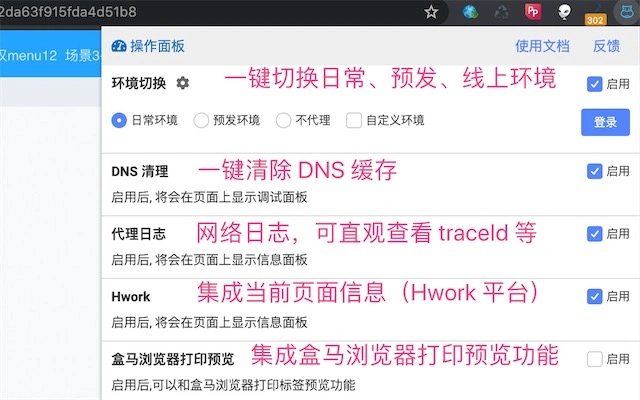
- Environment Switching – Enables seamless transitions between development, staging, and production environments with a single action, reducing manual configuration and human error.
- DNS Cleanup – Clears local DNS cache to resolve network-related issues that may arise during environment testing or service integration.
- Print Preview – Provides a ready-to-use preview function for documents, reports, or internal tools before final output or sharing.
- Integrated Hwork Support – Offers direct access to Hwork functionalities, streamlining workflow automation tasks within the BoxHema ecosystem.
- Unified Extension Management – Consolidates multiple BoxHema browser extensions into a single desktop interface, improving accessibility and reducing clutter.
These features are designed to enhance productivity by minimizing repetitive manual steps. For example, a developer can switch from a staging to a production environment and immediately clear DNS caches to ensure the latest configuration is active. The print preview function allows for quick validation of internal documentation before sharing with peers. The integration of Hwork suggests support for task automation, potentially reducing time spent on routine operations.
User Interface, Workflow & Performance
The user interface of 盒马研发助手 is structured to prioritize efficiency and clarity. Navigation is organized around core functions, with intuitive access to environment switching, DNS management, and print preview tools. The layout appears optimized for developers who value speed and minimal distraction, with essential controls positioned for quick access.
Workflow efficiency is enhanced by the consolidation of multiple tools into a single application. Users can perform a series of environment-related tasks without switching between browser tabs or external utilities. The software’s design supports a linear, task-driven experience, which is beneficial in high-pressure development scenarios.
Performance details were not specified by the developer. However, based on general software behavior, the application is expected to maintain stable operation during routine tasks. The installation size of 400 MB suggests it may include embedded utilities and libraries, which could influence startup time and memory usage. The developer did not provide additional system requirements or resource usage metrics.
Compatibility & System Requirements
盒马研发助手 is available for both Windows and Mac operating systems, making it accessible to a broad range of development teams. The software is compatible with the latest versions of these platforms, though specific version numbers were not listed.
The installation size is 400 MB, which indicates the inclusion of multiple integrated components and potentially embedded tools. The developer did not specify exact system requirements, including CPU, RAM, or disk space beyond the total file size. As such, users are advised to ensure their systems meet standard desktop application requirements for smooth operation.
Compatibility information was partially provided. While the supported platforms are confirmed, details on minimum hardware specifications remain unclear. Users should verify their system’s ability to run the application based on general desktop software benchmarks.
Pros and Cons
Pros
- Centralized management of multiple BoxHema extensions
- Streamlined environment switching for faster development cycles
- Integrated DNS cleanup to resolve network issues quickly
- Print preview functionality for internal documentation
- Free to download and use, with no licensing restrictions
Cons
- Limited public information about developer background and support channels
- No detailed system requirements provided
- Performance behavior under heavy usage not documented
- Currently only supports internal BoxHema workflows, limiting broader applicability
- Interface design details not publicly available beyond basic functionality
FAQ Section
Is 盒马研发助手 available for both Windows and Mac?
Yes, the software is compatible with both Windows and Mac operating systems.
Is the software free to use?
Yes, 盒马研发助手 is currently available at no cost. There are no subscription fees or hidden charges.
Does the tool require an internet connection?
While the core functionality can operate offline, certain features like environment switching may require network access to validate configurations or connect to remote services.
How often is the software updated?
The developer has not provided information on update frequency. Users are encouraged to check for the latest version regularly to ensure access to new features and security patches.
Can I use this tool outside of the BoxHema ecosystem?
Based on its design and integration with BoxHema-specific extensions, the tool is primarily intended for internal use within the BoxHema development environment. Its functionality may not be fully applicable to external workflows.
Final Thoughts + CTA
盒马研发助手 presents a focused, practical solution for developers working within the BoxHema technology stack. By consolidating essential tools like environment switching, DNS cleanup, and print preview into a single interface, it significantly improves workflow efficiency and reduces configuration errors. While detailed documentation and system requirements are limited, the tool’s clear purpose and free availability make it a valuable asset for internal engineering teams.
Its strength lies in integration and automation—ideal for professionals who manage multiple environments and rely on consistent, reliable tooling. Although it is not designed for general users or external developers, those within the BoxHema ecosystem will find it indispensable for daily operations.
Download 盒马研发助手 now
Guides & Tutorials for 盒马研发助手 Extension for Chrome
How to install 盒马研发助手 Extension for Chrome
- Click the Preview / Download button above.
- Once redirected, accept the terms and click Install.
- Wait for the 盒马研发助手 Extension for Chrome download to finish on your device.
How to use 盒马研发助手 Extension for Chrome
This software is primarily used for its core features described above. Open the app after installation to explore its capabilities.
User Reviews for 盒马研发助手 Extension for Chrome 0
No reviews found





